Simple Status MOD (Page 2)
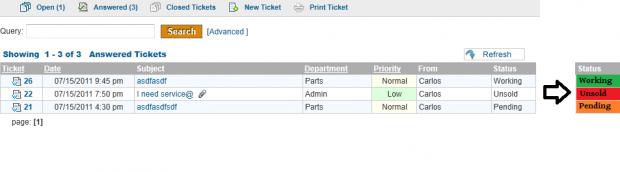
Now, lets create a way to enter new statuses into the database, then populate our status dropdown with the new statuses that we entered!
First, we add a table to list our status, once again youll need access to PHPMyAdmin or a similar database management software:
mysql> use osticket;
mysql> create table ost_status (status_id int auto_increment, status_name varchar(255), primary key(status_id));
In main.inc.php:
After:
define('GROUP_TABLE',TABLE_PREFIX.'groups');
Add:
define('STATUS_TABLE',TABLE_PREFIX.'status');
In include/class.nav.php:
After:
$tabs=array('desc'=>'Departments','href'=>'admin.php?t=depts','title'=>'Departments');
Add:
$tabs=array('desc'=>'Statuses','href'=>'admin.php?t=status','title'=>'Statuses');
In css/main.css
After:
#container {
Change the next line to this:
width;
In /scp/admin.php:
After:
$errors='No users selected.';
}
break;
default:
$errors='Uknown command!';
}
break;
Add:
case 'status':
$do=strtolower($_POST);
switch($do) {
case 'add_status':
// db field is 255 chars max
$status_name = substr($_POST, 0, 255);
$sql = 'INSERT INTO ' . STATUS_TABLE .
'(status_name) VALUES ('
.db_input($status_name) . ')';
echo $sql;
db_query($sql);
$msg = "Successfully added status.";
break;
case 'mass_process':
foreach($_POST as $id) {
$sql = 'SELECT * FROM ' . TICKET_TABLE .
' WHERE work=' . db_input($id);
$res = db_query($sql);
if(db_num_rows($res) != 0) {
$errors='Could not remove one or more'
. ' statuses because a ticket is currently ' .
'assigned that status.';
} else {
$sql = 'DELETE FROM ' . STATUS_TABLE .
' WHERE status_id='. db_input($id);
db_query($sql);
$msg = 'Status/Statuses Deleted';
}
}
break;
}
break;
After:
$page='syslogs.inc.php';
break;
Add:
// add
case 'status':
$page = 'statuses.inc.php';
$nav->setTabActive('status');
$nav->addSubMenu(
array('desc'=>'Statuses',
'href'=>'admin.php?t=status',
'iconclass'=>'preferences'));
break;
Add the following file:
include/staff/statuses.inc.php
With the contents:
<?php
if(!defined('OSTADMININC') || !$thisuser->isadmin()) die('Access Denied');
//List all statuses
$sql='SELECT status_name, status_id FROM ' . STATUS_TABLE;
$statuses = db_query($sql);
?>
<div class="msg">Statuses</div>
<table width="100%" border="0" cellspacing=0 cellpadding=0>
<form action="admin.php?t=status" method="POST" name="status" onSubmit="return checkbox_checker(document.forms,1,0);">
<input type='hidden' name='t' value='status'>
<input type=hidden name='do' value='mass_process'>
<tr><td>
<table border="0" cellspacing=0 cellpadding=2 class="dtable" align="center" width="100%">
<tr>
<th width="7px"> </th>
<th>Status Name</th>
</tr>
<?
$class = 'row1';
$total=0;
$ids=($errors && is_array($_POST))?$_POST;
if($statuses && db_num_rows($statuses)):
while ($row = db_fetch_array($statuses)) {
$sel=false;
if($ids && in_array($row,$ids)){
$class="$class highlight";
$sel=true;
}
?>
<tr class="<?=$class?>" id="<?=$row?>">
<td width=7px>
<input type="checkbox" name="ids" value="<?=$row?>" <?=$sel?'checked':''?>
<?php echo " onClick=\"highLight(this.value,this.checked);\">";?>
<td><a href="admin.php?t=status&id=<?=$row?>"><?=Format:($row)?></a></td>
</tr>
<?
$class = ($class =='row2') ?'row1':'row2';
} //end of while.
else: ?>
<tr class="<?=$class?>"><td colspan=6><b>Query returned 0 results</b></td></tr>
<?
endif; ?>
</table>
</td></tr>
<?
if(db_num_rows($statuses)>0): //Show options..
?>
<tr>
<td style="padding-left">
Select:
<a href="#" onclick="return select_all(document.forms,true)">All</a>
<a href="#" onclick="return reset_all(document.forms)">None</a>
<a href="#" onclick="return toogle_all(document.forms,true)">Toggle</a>
</td>
</tr>
<tr>
<td align="center">
<input class="button" type="submit" name="delete" value="Delete Selected Statuses?"
onClick=' return confirm("Are you sure you want to DELETE selected statuses?");'>
</td>
</tr>
<?
endif;
?>
</form>
<tr><td> </td></tr><tr>
<td align="center">
<form action="admin.php?t=email" method="POST" name="status">
<input type='hidden' name='t' value='status'>
<input type=hidden name='do' value='add_status'>
<input type=text name='status_name'>
<input class="button" type="submit" name="delete" value="Add Status">
</form>
</td>
</table>
Then you'll have to change the showOptionsDrop in staff/viewticket.php:
Code:
function showOptionsDrop($selected){ // shows all options but selected...
$string = '';
$sql = 'SELECT * FROM ' . STATUS_TABLE;
$res = db_query($sql);
while ($row = db_fetch_array($res)) {
$k = $row;
$v = $row;
if($selected == $k) // don't double display the selected option
$string .= '<option selected value="'.$k.'">'.$v.'</option>'."\n";
else
$string .= '<option value="'.$k.'">'.$v.'</option>'."\n";
}
return $string;
}
To allow editing of statuses, complete the following instructions:
in /scp/admin.php:
After:
case 'status':
$do=strtolower($_POST);
switch($do) {
Add:
case 'rename_status':
$status_name = substr($_POST, 0, 255);
$sql = 'UPDATE ' . STATUS_TABLE .
' SET status_name=' . db_input($status_name) .
' WHERE status_id=' . (int) $_POST;
//echo $sql;
db_query($sql);
$msg = "Successfully edited status.";
break;
>>