Ah excahange, how I love and hate thee.
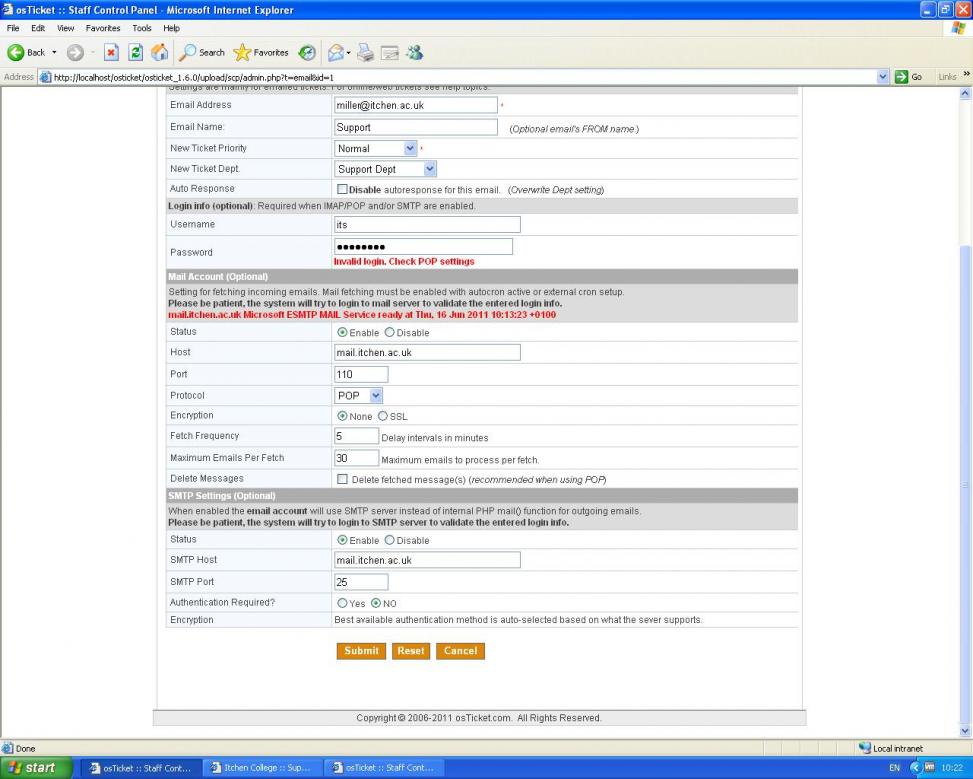
Please goto "Admin Panel" -> "Emails" -> click on the email address that will be polling -> scroll down to "Mail Account (Optional)".
Here is what we use for our Exchange 2007 server.
Status: Enable
Host: SERVERNAME (the short non-FQDN NetBios name)
Port: 143
Protocol: IMAP
Encryption: None
Fetch Frequency: 2
Maximum Emails Per Fetch: 10
Delete Message: checked
If that looks good head over to exchange. Three things to do and remember here:
1. Open the Exchange Management Console. Navigate to Recipient Configuration -> Mailbox and browse to the user that you are using to send/receive email. open up properties . Click on the "Mailbox Features" tab. Make sure that which ever protocol you are using is enabled. .
Remember neither of these are enabled in the stock Exchange 2007 installation so you will need to enable them if you haven't already.
2. Exchange 2007: ships with SSL/TLS turned on by default so try enabling SSL at encryption in OST. If it still doesn't work, then it might be #2. Alternatively you can shut this off I believe that it is called "Opportunistic TLS".
3. Exchange 2007: Requires a Transport rule to accept mail from other devices on the network.
Open the Exchange Management Console and goto Server Configuration -> Hub Transport -> under Receive Connectors. Most of the exchange servers I have looked at have a "Default" entry there. We also set on up for the "Copiers" in the building which are scan to email copiers. You can shut off or require different levels of security in this tab.
I hope that this points you in the right directions.