Hello Team,
I have installed OSTicket On Ubuntu 20.04 using the following cmd lines:
1- sudo apt update && sudo apt -y full-upgrade
[ -f /var/run/reboot-required ] && sudo reboot -f
2- sudo apt update
sudo apt install mariadb-server -y
3- sudo mysql_secure_installation
4- sudo mysql -u root
UPDATE mysql.user SET plugin = 'mysql_native_password' WHERE User = 'root';
FLUSH PRIVILEGES;
QUIT;
5- mysql -u root -p
Enter password:
Welcome to the MariaDB monitor. Commands end with ; or \g.
Your MariaDB connection id is 56
Server version: 10.3.22-MariaDB-1ubuntu1 Ubuntu 20.04
Copyright (c) 2000, 2018, Oracle, MariaDB Corporation Ab and others.
Type 'help;' or '\h' for help. Type '\c' to clear the current input statement.
MariaDB [(none)]>
6- mysql -u root -p
CREATE DATABASE osticket_db;
GRANT ALL PRIVILEGES ON osticket_db.* TO osticket_user@localhost IDENTIFIED BY "Google.123";
FLUSH PRIVILEGES;
7- sudo apt install apache2 -y
8- sudo systemctl start apache2
9- sudo systemctl enable apache2
10- sudo apt update
sudo apt install lsb-release ca-certificates apt-transport-https software-properties-common -y
sudo add-apt-repository ppa:ondrej/php
11- sudo apt update
sudo apt install php8.0 php8.0-common -y
sudo apt install php8.0-imap php8.0-apcu php8.0-intl php8.0-cgi php8.0-mbstring php8.0-gd php8.0-mysql php8.0-bcmath php8.0-xml -y
12- php -v
PHP 8.0.17 (cli) (built: Mar 20 2022 17:04:09) ( NTS )
Copyright (c) The PHP Group
Zend Engine v4.0.17, Copyright (c) Zend Technologies
with Zend OPcache v8.0.17, Copyright (c), by Zend Technologies
13- sudo apt install curl wget unzip -y
14- curl -s https://api.github.com/repos/osTicket/osTicket/releases/latest \
| grep browser_download_url \
| cut -d '"' -f 4 \
| wget -i -
15- unzip osTicket-v*.zip -d osTicket
16- ls osTicket
scripts upload
17- sudo mv osTicket /var/www/
18- cd /var/www/osTicket/upload/include
sudo cp ost-sampleconfig.php ost-config.php
19- sudo chown -R www-data:www-data /var/www/
20- sudo a2dissite 000-default.conf
sudo rm /var/www/html/index.html
sudo systemctl restart apache2
21- sudo vim /etc/apache2/sites-available/osticket.conf
22- <VirtualHost *:80>
ServerAdmin admin@example.com
DocumentRoot /var/www/osTicket/upload
ServerName myIP_Address
ServerAlias osticket.mydomainname
<Directory /var/www/osTicket/>
Options FollowSymlinks
AllowOverride All
Require all granted
</Directory>
 ErrorLog ${APACHE_LOG_DIR}/osticket_error.log
 CustomLog ${APACHE_LOG_DIR}/osticket_access.log combined
</VirtualHost>
23- sudo a2ensite osticket.conf
sudo systemctl restart apache2
24- sudo apachectl -t
25- Syntax OK
26- sudo systemctl restart apache2
27- Opened MyIPAddress , all requirements are satisified
OsTicket installed
28- sudo chmod 0644 /var/www/osTicket/upload/include/ost-config.php
29- sudo rm -rf /var/www/osTicket/upload/setup/
30- Installed LDAP plugin from https://osticket.com/download/
31- When filling (Default Domain, DNS Servers, LDAP Servers, Search User, Password, Search Base, OU=USERACCOUNTS,OU=OU1,OU=OU2,DC=DC1,DC=DC2,DC=DC3,DC=COM
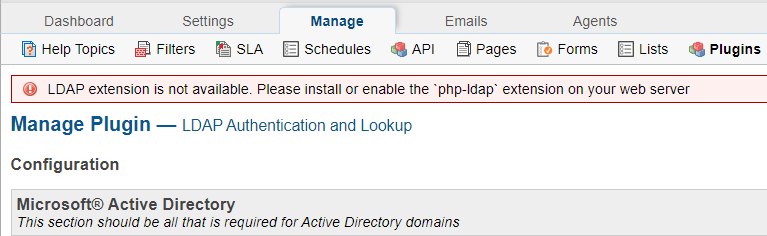
, LDAP Schema "Active Directory" and I enable Authentication for Staff members and clients, I get the following error message:

Thank you in advance for your support,
Kindest regards,
