Recently upgraded to version 1.16.1. Now when loading list of tickets and have the Last Response and Due Date columns showing if the columns are supposed to be blank they fill with wrong info after a few seconds. If I refresh the page they again fill with "Just Now" and then continue to change to 1 minute 2 minute and so on. If they are supposed to have data in the field then they keep the correct info. 2 days in the Due Date field is correct in the attached Photo. The rest should be blank.
@caves
Sounds like you have a Secondary Data Source set for the column. Go to Admin Panel > Settings > Tickets > Queues, click on the desired queue, click on Columns tab, and click Config next to the desired Column. Make sure you don't have a Secondary Data Source set. If you have a Secondary Data Source set then that means if the Primary Data Source is blank it will use the Secondary Data Source.
Cheers.
KevinTheJedi I see that area and could understand why that would happen but unfortunately that Column does not exist in the queues or has not been added to it. I first noticed this happening in my custom searches but I did go to the normal search queue Open/Open and added the last response column and the same thing happened.
I guess I don't understand what you mean. Show me exactly where you are seeing this data, what queue/search it's on, etc.
Essentially, give me full steps to replicate this issue.
Create a custom search (Helpdesk) Add Columns Last Response and Due Date These are new tickets and have had no response. They just continue to increase in time until I click refesh and they go blank for a few seconds and then go to Just Now and start counting up by the minute. The Due date does the same thing when it is blank.
Forgot last pic
Okay that’s a saved search and it definitely has custom columns. So click the cogwheel next to the saved search name and go to the Columns tab. Now click Config next to the desired column and check the data sources.
I am not seeing a config in the settings/columns windows.
Hello @KevinTheJedi and @caves
I am having the same issue as @caves .
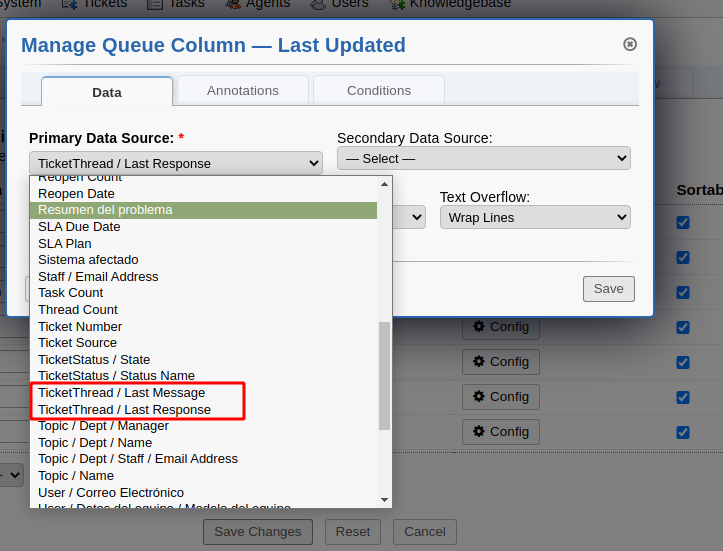
I tried with TicketThread / Last Response and TicketThread / Last Message withouth success.
But at ticket thread, appear it fine:
Best regards,
@caves Kev is saying: Click on Search. Click on your saved Search Click on the Gear.
@nuo You should start your own thread.
ntozier That is exactly what I did. I hovered over search Clicked on Helpdesk and then selected the Gear Icon and clicked edit. That is the window that came up. There is no config button.
I can replicate this. We are looking into it.
Hello @KevinTheJedi
I opened a new thread as ntozier said.. this is why I opened a new one.
Thanks for your time,
@nuo
Y’all are having the same issue, it’s fine.
@caves @nuo
Below is the fix for this issue:
This will be included in the next release.
Hello,
With that fix, its working fine now.
Thank you, Kevin
We added the fix and we are still seeing an issue. After you refresh the page it seems like it will first list the correct info along with Blank columns if there is no response. After about 15 seconds it will load Just Now into the blank columns and continue to count up by minutes. At refresh
15 seconds after refresh
Go to the Queue Columns and update the Primary Data Source for the Last Response column to TicketThread / Last Response.
Primary Data Source
Last Response
TicketThread / Last Response
If it still doesn't work then you didn't apply the patch correctly.
Still having the same issue. Have verified code change is correct. See pic1. When I go to my search settings there is no Config Button. Only when I go to the Queues column there is a config button but I do not have the Column listed in this window. Only have Last Updated and it shows Primary Data Source as Last Updated. See Pic 2 If I go to Open Queue where I have the Last Response and select settings/Columns there is no Config Button. See Pic 3 When the pages first pop up the columns are blank and then after 15 seconds or so the "just Now" pops up. If the Last Response column is supposed to have data it shows it correct right away and it stays correct after the 15 secs. Just the blank ones change. It like it on happens when it refreshes the time. Hope this extra info helps.
Pic1
Pic2
Pic3
I just found how to get to my custom search Queue. Found that it was number 58 and then went to queues and added scp/queues.php?id=58#columns to the line and see a config button now. Looks correct. See pic